



Views: 0 Author: Site Editor Publish Time: 2026-07-29 Origin: Site


In fast-paced restaurants, seconds lost at the checkout counter quickly compound into operational bottlenecks. When your point-of-sale hardware lags during peak service hours, it directly creates longer customer queues. These delays translate immediately into slower table turnover. To solve this, successful venues now shift away from legacy impact printers. They adopt direct thermal technology at the checkout station instead.
A high-quality thermal receipt printer is no longer just a basic peripheral. It acts as a critical component for stabilizing your Front-of-House (FOH) workflows. Moving to this technology reduces consumable overhead while ensuring accurate customer communication. You will learn exactly how this printing method eliminates everyday friction for your staff. We will explore strategic hardware placement between the kitchen and the counter. Finally, you will discover the core evaluation criteria needed to choose the right model for your specific environment.
Speed & Volume: Direct thermal printing yields faster output (up to 300mm/s) and completely eliminates ink/ribbon replacement downtime.
Strategic Placement: Thermal printers are optimal for FOH operations and barista stations, whereas impact printers remain necessary for high-heat kitchen environments (BOH).
Cost Efficiency: While upfront hardware costs exist, long-term expenses drop drastically due to zero ink requirements and affordable paper rolls.
Standardization: The 80mm thermal receipt printer is the universally accepted baseline for POS compatibility and receipt readability.
Legacy printing mechanisms frequently disrupt fast-paced hospitality workflows. Older dot-matrix models rely on physical impact and inked ribbons. Ribbon jams almost always occur during your busiest shifts. Your staff waste precious minutes fixing hardware instead of serving guests. Furthermore, the loud grinding noise of impact printers ruins the ambiance in quiet cafes. Slow transaction closures inevitably stall the entire ordering line. You cannot afford these cumulative delays during a massive lunchtime rush.
Your hardware reliability directly shapes the final customer touchpoint. Guests judge your brand based on their final interactions. Smudged or illegible printouts frustrate customers trying to read their itemized totals. Slow printing speeds damage the perceived quality of your service. If a customer waits an extra thirty seconds for a piece of paper, they walk away annoyed. We know a crisp, instantly printed bill leaves a highly professional final impression.
Direct thermal technology solves these everyday frustrations instantly. The internal mechanism applies controlled heat directly to chemically treated paper. You never need to replace wet ink cartridges or tangled ribbons again. This "no-ink" operational advantage provides immediate relief for your busy team. It completely removes ink inventory management from daily staff duties. They simply drop in a new paper roll and close the lid. This simple action frees up your employees to focus entirely on the guest experience.
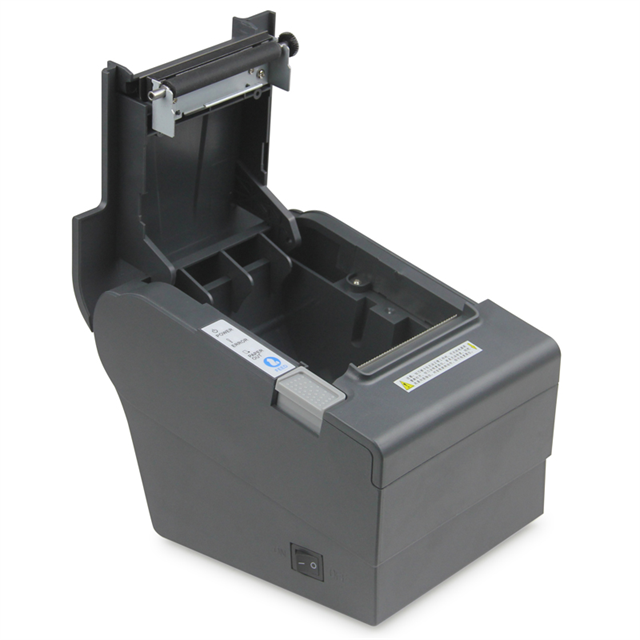
Establishing clear boundaries for hardware deployment ensures smooth daily operations. You must base your printer placement on actual environmental realities. A reliable restaurant receipt printer serves different roles depending on its physical location. We highly recommend separating your zones into Front-of-House (FOH) and Back-of-House (BOH) environments.
Thermal models absolutely dominate the Front-of-House and barista stations. First, they deliver whisper-quiet operation. You do not want loud, clacking hardware disrupting your carefully curated cafe playlist. Second, they produce high-resolution logo and barcode graphics. This makes loyalty programs and digital survey QR codes highly accessible to patrons. Finally, rapid receipt generation clears counter lines much faster. Cashiers hand over the check instantly and immediately call the next order.
However, you must face the Back-of-House reality check. Thermal paper reacts strongly to intense environmental heat. Direct exposure to expo lines, deep fryers, or heat lamps will turn thermal paper completely black. This instantly ruins the kitchen chit. The expediter cannot read the order, and food gets delayed. For these hot zones, we strongly advise sticking to traditional dot-matrix impact printers. You should reserve your thermal units strictly for FOH environments, beverage stations, and cold-prep areas. Proper zone delineation prevents lost tickets and chaotic kitchen communication.
Hardware specifications can easily overwhelm new buyers. We suggest focusing on a few highly practical metrics. Print speed acts as a common marketing highlight. Manufacturers often advertise speeds between 250 and 300 millimeters per second. While this represents a strong benchmark, reality often looks slightly different. Your actual printing speed heavily depends on your POS software data processing rate. If your tablet processes orders slowly, the fastest printer still waits for data.
Interface and connectivity requirements demand careful consideration. Hardwired connections like USB and Local Area Network (LAN) provide the best stability. They work perfectly for fixed POS terminals bolted to a counter. Wireless options like Wi-Fi and Bluetooth are necessary for mobile POS (mPOS) setups. However, wireless deployment requires robust local network infrastructure to prevent dropped connections.
You also need to check specific reliability metrics before buying. Educate yourself on the Mean Cycles Between Failures (MCBF) rating. This number indicates how long the internal mechanisms will last under heavy continuous use. Additionally, ensure the autocutter is rated for at least 1.5 to 2 million cuts. A broken cutter ruins the operational flow immediately, forcing cashiers to tear receipts manually.
To summarize these evaluation points, let us look at a quick comparison chart of core criteria.
Feature Category | Ideal Specification | Real-World Consideration |
|---|---|---|
Print Speed | 250–300mm/s | Speed remains limited by POS software data transfer rates. |
Connectivity | USB / Ethernet (LAN) | Wireless is excellent but requires a flawless local router setup. |
Autocutter Life | 1.5M - 2M Cuts | Crucial metric for avoiding manual tearing and paper jams. |
Mechanism Reliability | High MCBF Rating | Determines how many years the device lasts before replacement. |
The POS market overwhelmingly favors one specific size category. An 80mm thermal receipt printer stands as the universally accepted baseline. It provides superior readability for both staff and customers. The wide format offers enough space for clear itemization. You can easily fit long modifier text, discount lines, and promotional QR codes without causing unnatural line breaks.
Media availability also drives this widespread standard. The required 80x80mm thermal paper rolls are heavily commoditized. You can source them globally from numerous suppliers. This widespread availability ensures highly competitive pricing for your consumables. You will rarely face backorders or supply chain issues when buying standard 80mm rolls. In contrast, odd sizes often force you into expensive proprietary paper contracts.
Even the best hardware faces environmental challenges. We regularly see connectivity drops in modern hospitality venues. You must warn your IT team against deploying Wi-Fi or Bluetooth models recklessly. Unreliable network infrastructure ruins wireless printer performance. Severe signal interference often comes from large stainless steel counters, commercial microwaves, and thick kitchen walls. If your signal drops, the kitchen never receives the order. We recommend testing signal strength thoroughly before committing to wireless mPOS setups.
Paper quality sensitivity is another hidden risk. Many owners try to save money by purchasing cheap, low-grade thermal paper. This is a common and costly mistake. Low-quality rolls create excessive "paper dust" during the automatic cutting process. This fine dust quickly accumulates inside the machine gears. It can clog printheads and eventually void your manufacturer warranty. Investing in standard, high-quality rolls directly protects your hardware investment.
Finally, you must accept certain maintenance truths. These devices are certainly low-maintenance, but they are not zero-maintenance. They require basic care to function properly over many years. You must perform periodic printhead cleaning. Simply wiping the thermal head gently using a swab dipped in isopropyl alcohol works wonders. This simple routine prevents premature hardware failure. It removes built-up chemical residue and ensures your printed text remains crisp and dark.
Here is a brief list of best practices for maintaining your hardware:
Secure Cables: Routinely check power and LAN cables. Ensure they sit firmly in their ports to prevent accidental disconnections.
Clean Regularly: Use isopropyl alcohol on the printhead once a month. This removes paper dust and chemical residue safely.
Store Paper Properly: Keep thermal paper rolls in a cool, dark, and dry place. This prevents premature darkening before use.
Avoid Moisture: Keep the device away from espresso machine steam wands and dishwashing splash zones.
Choosing the right model requires logical elimination. Step one involves assessing your current POS ecosystem. Compatibility remains completely non-negotiable. The printer must be explicitly supported by your restaurant’s existing operating system. Check if your main software runs on iOS, Android, or Windows. Review the approved hardware lists for major software platforms like Square, Toast, or Lightspeed. If the device is not listed there, it likely will not work.
Next, evaluate the warranty and support agreements closely. Hardware failures directly impact your daily revenue. Look for comprehensive two-to-three-year warranties. Prioritize brands offering advance replacement options. This minimizes your operational downtime significantly. If a unit fails on a busy Friday, you need a replacement shipped immediately. You cannot afford to wait for a lengthy mail-in repair process.
Finally, avoid over-specifying your purchase. Many owners pay high premiums for complex multi-interface models. Buying a unit equipped with USB, LAN, and Wi-Fi makes little sense if your business operates differently. If you only utilize a fixed iPad-to-Bluetooth setup, simply buy a dedicated Bluetooth model. Stop paying for network interfaces you will never actually use. Keep your hardware aligned strictly alongside your operational needs.
Migrating to or upgrading your point-of-sale hardware is a low-risk, high-reward operational decision. Modern printing technology eliminates costly consumable management. It speeds up your checkout lines noticeably. This directly stabilizes your Front-of-House workflows and improves the overall guest experience. By understanding the strict boundaries between the kitchen and the counter, you protect your hardware from severe environmental damage.
Before you submit any new purchase orders, take the following actions:
Audit your current POS software compatibility list to ensure seamless integration.
Measure your available counter space to confirm the unit will physically fit.
Check your network strength if you plan to use wireless connections.
Confirm your paper supplier stocks standard 80x80mm rolls.
By following these practical steps, you will equip your team with reliable tools. Your operations will run smoother, and your business will continue moving forward without technical interruptions.
A: No. They use a heated printhead on chemically treated thermal paper. This eliminates the need for ribbons or ink cartridges, significantly reducing consumable costs.
A: It is generally discouraged. Extreme ambient heat or exposure to heat lamps can turn the thermal paper completely black. Impact printers remain much safer for hot Back-of-House areas.
A: A 58mm model is compact and used mostly for basic mobile card terminals. The 80mm format is the standard for full restaurant POS setups. It allows for detailed itemization, modifiers, and logos.
A: Depending on storage conditions and paper grade, they typically last 1 to 3 years. They are not recommended for long-term archival purposes unless you scan them digitally first.


