



Views: 0 Author: Site Editor Publish Time: 2026-11-10 Origin: Site


Long queue times represent the primary friction point in retail grocery operations today. They directly correlate with customer churn and abandoned shopping carts. Shoppers demand immediate service, and any delay quickly ruins their in-store experience. Transitioning from legacy or manual entry systems to modern scanning hardware is not just a standard IT upgrade. It serves as a critical operational necessity for comprehensive margin protection. Reliable scanning technology protects revenue by eliminating manual errors at the register. In this guide, we will explore how deploying the right barcode scanner for grocery checkout directly influences transaction throughput. You will discover how these advanced devices improve loss prevention and maintain real-time inventory accuracy. We will outline actionable steps to help you optimize your checkout lanes for peak operational efficiency.
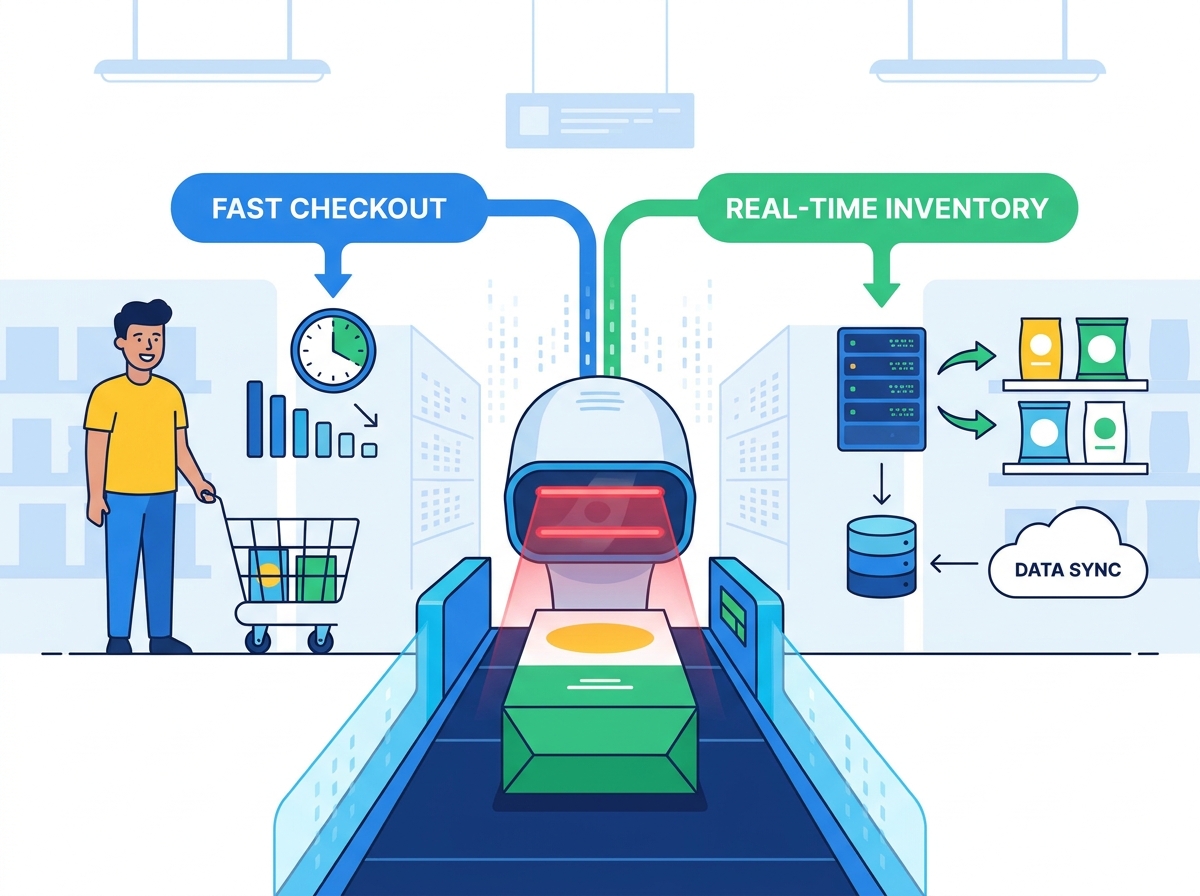
Throughput Acceleration: Modern omnidirectional and bi-optic scanners eliminate the need for cashiers to perfectly align items, shaving seconds off every scan.
Error Reduction: Automated data capture removes manual keying errors, standardizing billing accuracy and protecting tight grocery profit margins.
Inventory Synchronization: Every scan updates backend systems in real time, triggering automated reordering and accurate stock-level reporting.
Strategic Evaluation: Choosing between handheld, presentation, and in-counter scanners depends heavily on store layout, average basket size, and existing POS architecture.
Long queues drive customers away. Grocery profit margins remain famously thin across the industry. You simply cannot afford to lose shoppers to inefficient checkout lines. When wait times stretch beyond five minutes, basket abandonment rises sharply. The business cost of a slow queue is severe and measurable.
Advanced 2D scanners provide a massive omnidirectional scanning advantage for modern retailers. They read barcodes from nearly any angle effortlessly. Cashiers no longer need to hunt for the barcode on every package. They do not have to perfectly align items against a strict laser beam. This flexibility eliminates major physical friction points. It saves precious seconds on every single item scanned.
High-volume environments require specialized hardware optimization. Operational success depends on high scans-per-minute metrics. You need scanners operating in continuous read modes to maintain momentum. These devices keep the line moving steadily during peak hours. High throughput directly improves overall customer satisfaction scores. It also maximizes the number of transactions processed per shift.
Self-checkout kiosks also benefit massively from intuitive scanning hardware. Customer-facing interfaces must remain incredibly simple to use. Shoppers lack professional cashier training and muscle memory. An advanced barcode scanner for grocery checkout empowers these self-service kiosks. It easily captures data from awkward angles and poor lighting. This capability redistributes queue pressure effectively across the store. It allows your staff to handle more complex customer service tasks elsewhere.
Manual entry creates severe vulnerabilities at the point of sale. Cashiers often type Price Look-Up (PLU) codes manually for loose produce. This manual keying process introduces unacceptably high error rates. A single miskey alters the entire transaction value instantly. Over hundreds of daily transactions, these tiny errors multiply rapidly. They slowly erode tight grocery profit margins without detection. Automated scanning removes this risk entirely. It standardizes billing accuracy seamlessly across all lanes.
Modern scanners pull real-time pricing directly from the central database. This connection guarantees flawless promotional pricing application every time. Cashiers do not need to memorize complex daily markdowns. The backend system applies bulk discounts automatically upon scanning. Customers receive the exact price advertised on the shelf. This accuracy builds long-term shopper trust and loyalty. It also prevents legal disputes over accidental pricing discrepancies.
Consistent scanning protocols actively mitigate aggressive inventory shrinkage. Retailers often struggle against a practice known as "sweethearting." This happens when cashiers give unauthorized discounts to friends or family. A strict scan-only policy prevents this behavior completely. It also captures accidentally missed items hidden at the bottom. Cashiers can easily scan heavy goods left in the shopping cart. They do not have to physically lift them onto the belt. This thoroughness ensures you charge accurately for every item leaving the store.
Retail data serves as a highly critical operational asset today. The checkout scanner represents the final data touchpoint in a store. It completes the complex inventory lifecycle perfectly. Every beep signifies a successfully completed sale. It also generates vital data for backend operations teams.
Reliable hardware integrates smoothly into enterprise inventory management systems. Automated stock depletion occurs instantly after a successful scan. It deducts sold goods from the database without delay. Store managers gain real-time visibility into current stock levels immediately. They can easily identify fast-selling items during rush hours. This instant feedback loop actively prevents unexpected inventory shortages.
Accurate checkout data feeds directly into predictive reordering algorithms. These intelligent systems analyze sales velocity in real time. They automatically generate purchase orders for rapidly depleted items. This automation is crucial for Fast-Moving Consumer Goods (FMCG). High-velocity items like bread and milk require constant, flawless replenishment. Reducing stockouts keeps shelves full and maximizes daily revenue.
We also see growing synergy between scanners and Electronic Shelf Labels (ESL). Digital tags update prices dynamically throughout the entire store. Synchronized scanner data ensures perfect alignment between systems. The shelf price always matches the register price exactly. This achieves strict 100% compliance during major promotional events. It essentially eliminates manual paper tag audits. Staff can focus on active merchandising instead of changing price tags.
Operational Metric | Legacy Manual Systems | Automated Scanning Integration |
|---|---|---|
Inventory Accuracy | Prone to daily human errors | Near 100% real-time accuracy |
Pricing Compliance | Requires constant auditing | Synchronized automatically |
Restock Speed | Delayed until end-of-day reports | Instant predictive triggers |
Labor Allocation | Wasted on manual price checks | Focused on customer service |
Hardware choices depend heavily on your specific operational realities. Different store layouts require distinct scanning solutions for optimal flow. We break down the primary solution categories below to guide you.
In-Counter and Bi-Optic Scanners: These suit traditional, high-volume grocery lanes perfectly. They handle massive transaction volumes efficiently. They are strictly designed for large, weekly shopping baskets.
Presentation Scanners: These sit compactly directly on the counter. They are ideal for convenience store setups. They work perfectly in tight, narrow checkout environments.
Rugged Handheld Scanners: Cashiers use these specifically for heavy or bulky items. They scan cases of water directly in the shopping cart. This active scanning prevents lifting injuries and speeds up the checkout process.
We strongly recommend transitioning entirely to 2D imagers. They are quickly becoming the mandatory global industry standard. Older 1D lasers only read simple linear barcodes on flat surfaces. Modern 2D imagers read complex QR codes effortlessly. They can scan digital loyalty coupons directly from mobile screens. They also read damaged, wrinkled, or frosted labels easily. This capability is vital for scanning condensation-covered frozen goods.
Physical durability remains a strict, non-negotiable factor. Grocery environments are surprisingly harsh on electronic equipment. Hardware faces constant liquid spills and sudden physical drops. Condensation from cold items frequently damages sensitive internal electronics. You must establish strict durability requirements before purchasing. Always look for high Ingress Protection (IP) ratings. Check specific drop-spec ratings to ensure longevity. You need devices explicitly built to survive repeated falls onto solid concrete.
Upgrading hardware always introduces baseline POS compatibility risks. You must verify scanner connectivity thoroughly before deployment. Common connection types include standard USB, RS-232, and secure Bluetooth. You must also confirm driver compatibility carefully. Legacy Point of Sale software often requires specific legacy communication protocols. Ensure your new hardware parses data correctly into existing backend systems. A mismatch here causes severe operational downtime.
Staff adoption ultimately determines the success of your rollout. Physical ergonomics play a massive role in daily cashier operations. Cashiers handle thousands of unique items during an 8-hour shift. Poorly designed hardware frequently causes repetitive strain injuries (RSI). You must prioritize lightweight and ergonomically balanced devices. Comfortable tools keep staff morale high and reduce fatigue. They also actively reduce costly workers' compensation claims over time.
IT buyers need a highly pragmatic approach to implementation. We recommend following a structured shortlisting process to minimize risk.
Request physical pilot units from multiple hardware vendors.
Test these devices extensively in actual store environments.
Use real, physically damaged store inventory for scan tests.
Verify mobile screen read-rates under harsh fluorescent store lighting.
Confirm firmware update processes align with your internal IT policies.
Audit physical cable lengths for optimal register configuration.
Following these specific steps guarantees a much smoother deployment. It easily uncovers hidden compatibility issues before a full-scale regional rollout.
Investing in premium scanning hardware directly improves customer experiences. It also secures your operational margins by actively preventing revenue leakage. Your checkout lanes are the final impression shoppers take home. Smooth, rapid transactions build lasting customer loyalty.
Decision-makers must remember one highly critical detail. Hardware is only as effective as the POS software it feeds. Upgraded scanners cannot fix fundamentally broken backend inventory systems. Ensure your entire software stack can process high-velocity data accurately.
Audit your current queue times and error logs immediately. Identify specific operational bottlenecks causing customer friction. Use this concrete data to build a strong business case. Upgrading your scanning infrastructure is a necessary step for modern retail success.
A: Modern 2D imagers capture data instantly from nearly any angle. They offer true omnidirectional scanning capabilities. Cashiers do not need to align a specific laser line perfectly with the barcode. This flexibility significantly speeds up the standard scan-and-bag motion. It can easily shave several seconds off every single item scanned.
A: Yes, provided they are digital 2D imagers. Traditional 1D lasers cannot read digital screens due to severe glass reflections. Upgrading to 2D scanners is a critical requirement today. It allows you to process app-based loyalty programs, digital gift cards, and electronic coupons flawlessly.
A: A high-quality scanner typically lasts between five and seven years. This lifespan depends heavily on initial build quality and the specific store environment. Device failure usually stems from physical cord degradation or repeated drops onto concrete floors. Evaluating ruggedness and specific drop-spec ratings is absolutely essential during procurement.
A: No. Most modern scanners offer simple plug-and-play integration out of the box. They connect seamlessly via standard USB or serial ports. However, you must verify firmware and software routing carefully. Thorough testing ensures the new hardware parses data correctly into your existing POS architecture without requiring a total system overhaul.


