



Views: 0 Author: Site Editor Publish Time: 2026-11-05 Origin: Site


Point-of-sale hardware drives your daily operational efficiency. It directly impacts customer satisfaction during your busiest dining hours. You need reliable equipment to keep orders flowing without interruption. A thermal receipt printer for restaurants acts as the vital communication bridge. It connects your front servers directly to your kitchen staff. Without it, order tickets get lost in the shuffle. Customers wait longer for their food, and table turnover plummets.
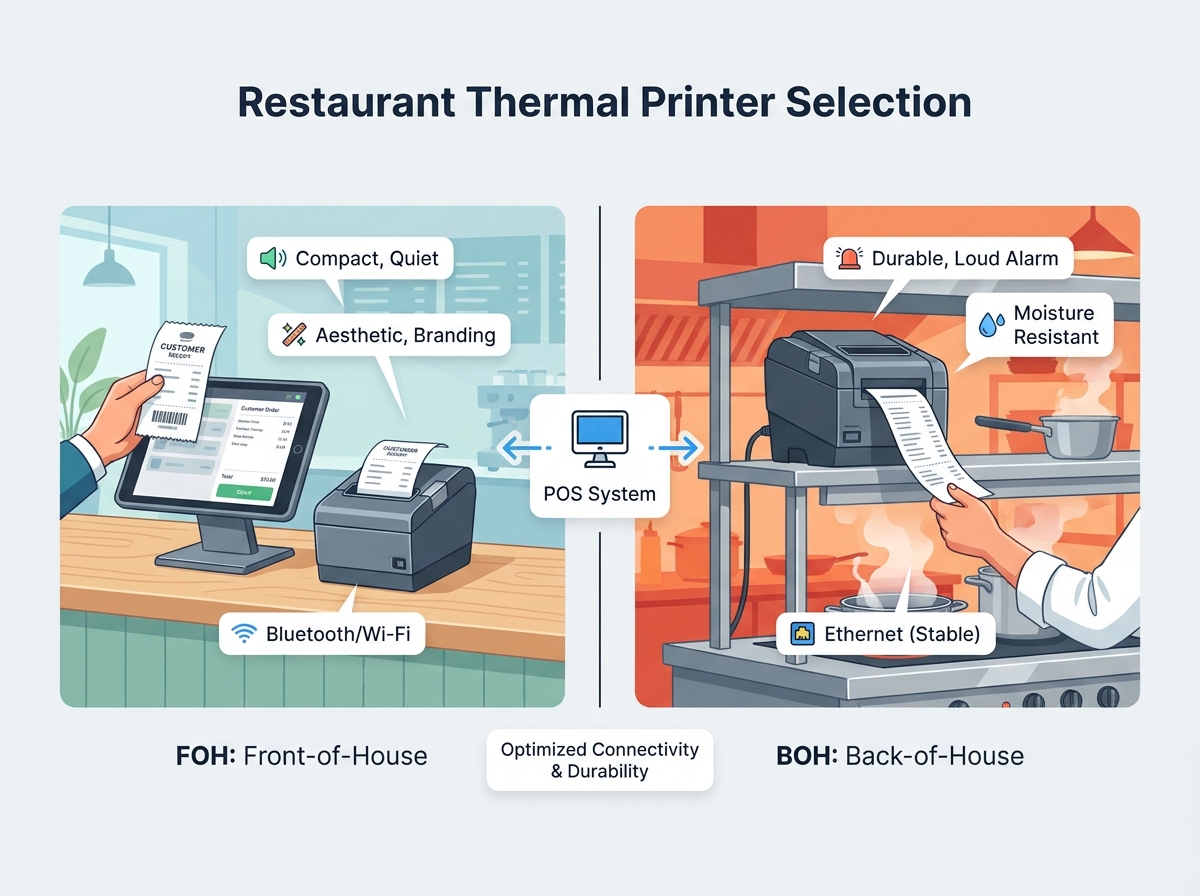
We must strictly distinguish between front-of-house and back-of-house printing requirements. Front-of-house printers hand receipts directly to your customers. They need to look clean, compact, and operate quietly. Back-of-house printers send order tickets to the cooks. They must survive extreme heat, airborne grease, and chaotic kitchen noise.
This guide provides a clear framework. You will learn how to choose the right hardware for your specific venue. We balance speed, connectivity, and environmental durability. You will explore essential features like auto-cutters and high-decibel alarm buzzers. You can then confidently select a reliable printer. Your well-informed choice will keep your restaurant running smoothly through every dinner rush.
Connectivity Matters: Prioritize printers with versatile interfaces (Ethernet, USB, Bluetooth/Wi-Fi) to match your existing POS architecture.
Environmental Suitability: Differentiate between front-of-house (aesthetic/compact) and back-of-house (durable/noise-alert) hardware needs.
Lifecycle Costing: Focus on TCO (Total Cost of Ownership), including paper roll compatibility and maintenance/support requirements, rather than just upfront price.
Integration Stability: Ensure compatibility with your current POS software via standard drivers (ESC/POS) to prevent data bottlenecking.
Every dining establishment operates differently. You must assess your specific physical environment before buying any hardware. Understanding these basic needs prevents costly mismatched equipment purchases.
FOH and BOH zones demand completely different hardware specifications. FOH areas require compact footprints. Space around the cash register is highly valuable. You want quiet operation to maintain a pleasant dining ambiance. High print quality is also vital here. You need crisp logos and clear text for branding purposes. A sleek aesthetic fits better in a cafe or fine dining host stand.
BOH areas present harsh, punishing conditions. Kitchen printers face high heat daily. They endure grease splashes, water spills, and airborne flour. BOH units require robust construction. Moisture resistance is non-negotiable near dishwashing stations. They also need a high-decibel internal buzzer. Cooks must hear new order alerts over clanking pans and exhaust fans. Standard FOH models fail quickly in these demanding environments.
You need to evaluate your peak-hour transaction volume accurately. High-volume cafes process hundreds of orders an hour. This peak volume dictates your required print speed. Speed is measured in millimeters per second (mm/s). A slow printer creates a massive bottleneck at the counter. Faster units clear order lines quickly. We suggest observing your busiest Friday night. Count how many tickets print per minute. This baseline helps you choose the correct model. Do not underestimate your peak demand.
Always review your existing POS software first. Does it require specific printer firmware? Many modern iPad point-of-sale systems strictly limit hardware choices. They only sync with certain pre-approved brands. Some software demands proprietary drivers to function correctly. Industry standards, such as the ESC/POS command system, act as the universal language for receipt formatting. However, always check your software provider’s compatibility list before purchasing any hardware. Buying a printer first often leads to frustrating return processes. Ensure the software ecosystem matches perfectly.
You must look beyond the brand name. Technical specifications determine how well the printer performs under pressure. Knowing these metrics helps you make an informed, confident decision.
How your printer talks to your POS network is critical. You have three main connectivity options to evaluate.
Ethernet (Hardwired): This remains the absolute gold standard for kitchen setups. Cables provide unmatched stability. They resist wireless interference from commercial microwaves. Solid walls do not affect their data transmission.
Bluetooth/Wi-Fi: Wireless options suit mobile POS tablets. They work perfectly for pop-up service counters. Outdoor patios benefit heavily from them too. Keep in mind, Wi-Fi requires a strong local network. Network dead zones will drop crucial tickets.
USB: This is a simple, tethered solution. USB connections fit single-station setups perfectly. They offer reliable plug-and-play simplicity. However, they lack multi-device sharing capabilities.
You must balance receipt generation time against print quality. A standard thermal receipt printer for restaurants outputs at roughly 200 to 300 millimeters per second. Fast speeds prevent customer queues from forming. However, complex logos or QR codes need higher resolution. Sometimes, printing too fast causes blurry barcodes. Customers cannot scan blurry loyalty codes on their phones. Find a model allowing manual speed adjustments. You can tune it perfectly for your specific receipt layout.
Hardware lifespan relies on two main metrics. First, look at the MCBF. This stands for Mean Cycles Between Failures. This number tells you how many millions of lines the printer can output before jamming. Second, check the TPH life expectancy. TPH means Thermal Print Head. High-heat kitchen settings degrade print heads faster than air-conditioned counters. Look for a TPH rating of at least 100 kilometers. These numbers prove the unit is built for heavy commercial stress.
Busy shifts expose hardware weaknesses quickly. You need features designed specifically for high-traffic operations. Small conveniences save immense time during a chaotic dinner rush.
You cannot rely on manual tearing during a dinner rush. High-durability auto-cutters prevent annoying paper jams. They slice cleanly through the paper. They usually leave a tiny bridge of paper attached. This ensures the ticket does not fall to the dirty floor. Assess the cutter life rating carefully. Aim for a mechanism rated for at least 1.5 million cuts. Cheap cutters dull quickly. They snag the paper and completely halt kitchen production.
Kitchen printers must alert staff immediately. A busy chef rarely looks at the printer tray. They keep their eyes focused on the grill. They need to hear the order arrive. External or loud internal alarms ensure staff visibility. They broadcast new orders loud and clear. In our experience consulting with hospitality groups, neglecting kitchen buzzers leads directly to missed orders. Some models feature flashing LED lights alongside the buzzer. This dual-alert system is highly recommended. It guarantees no order goes unnoticed.
Staff downtime hurts daily profitability. Reloading paper should take seconds. Look for "drop-in" paper loading designs. Your servers just open the lid, drop the roll, and close it. Complicated threading mechanisms waste precious time. Additionally, check the capacity for large-diameter rolls. Larger rolls mean fewer changes during peak hours. This keeps your cashiers focused entirely on your guests.
Purchasing hardware is just the first step. You must understand the long-term financial impact of your equipment. Smart investments yield better daily reliability and fewer headaches.
Do not just buy the cheapest unit available. Budget models often feature plastic internal gears. They break easily under heavy commercial use. The cheapest unit often leads to higher service costs over a three-year period. Investing in a commercial-grade thermal receipt printer for restaurants reduces downtime drastically. You spend less on emergency repair calls. You avoid buying frequent replacement units. Quality hardware pays for itself through steady, unbroken performance.
Paper choices impact your daily operating budget. Industry standards dictate specific paper widths. The 80mm width is standard for most detailed receipts. It holds logos, tipping lines, and long itemized lists easily. The 58mm width suits space-constrained environments better. Food trucks and pop-up kiosks often prefer this smaller size. Roll diameter also matters. A larger diameter reduces your supply procurement frequency. Standardized sizes make bulk ordering easier. Bulk ordering naturally lowers your cost per receipt.
Always evaluate manufacturer warranty coverage deeply. A standard one-year warranty might not suffice for a busy kitchen. Look for extended coverage options. Availability of replacement parts is crucial. Check if you have local technical support access. Fast support prevents a broken printer from ruining your entire weekend service. Call the vendor before buying. Test their response time. Reliable technical support is worth a slightly higher price tag.
Following a structured process prevents costly mistakes. You should test hardware methodically before fully committing your budget.
Create a matrix comparing your top three candidates. You should grade them based on Connectivity, Durability, and Software Compatibility. This objective approach highlights the best overall value for your venue.
Printer Evaluation Matrix
Evaluation Criteria | Option A (Budget) | Option B (Mid-Range) | Option C (Premium) |
|---|---|---|---|
Connectivity | USB Only | USB + Ethernet | Wi-Fi + Ethernet + USB |
Durability (MCBF) | 30 Million Lines | 50 Million Lines | 70 Million Lines |
Software Compatibility | Windows Only | ESC/POS Standard | Universal / Cloud Ready |
Alerts | None | Beep Only | Loud Buzzer + LED |
We highly recommend testing a single unit before a full-scale rollout. This cautious step minimizes operational risk.
Order one test printer from your shortlisted vendor.
Set it up at your busiest service station.
Monitor its speed and reliability during a weekend rush.
Ask your staff for feedback regarding paper loading.
Verify it syncs perfectly with your current POS software.
Only after a successful pilot test should you buy units for the whole restaurant.
Ensure your hardware meets regional standards. Many tax authorities require precise digital tax recording. Your printer might need to support secure transaction logging. Check local laws regarding receipt data storage. Secure network protocols protect your Wi-Fi printers. They prevent unauthorized access to sensitive customer data. Keeping your printer firmware updated blocks potential network vulnerabilities.
Selecting the right hardware transforms your daily operations. A reliable printer prevents massive bottlenecks during your busiest hours. It minimizes technical friction for your staff. This allows them to focus entirely on customer service instead of fighting jammed paper.
Keep these practical action steps in mind as you move forward:
Map out your exact physical locations for printers before buying.
Verify software compatibility with your POS vendor first.
Run a single-unit pilot test during a busy weekend shift.
Stock up on the correct bulk paper sizes immediately.
Re-evaluate your hardware whenever POS software updates occur. Floor plan expansions also justify a hardware review. Proactive upgrades keep your kitchen running smoothly without any unexpected interruption.
A: Yes. BOH environments require specific durability against heat and grease. Standard FOH printers lack this rugged protection. Kitchen units also need louder buzzers to alert staff in noisy environments.
A: The 80mm width is the industry standard for traditional restaurants. It provides ample space for logos and itemized lists. However, 58mm is often used for space-constrained environments like food trucks.
A: While possible, Ethernet is strongly recommended for kitchen environments. Hardwired connections ensure stable connectivity. They avoid wireless interference from microwaves, thick walls, and other commercial kitchen equipment.
A: It depends heavily on your usage volume. Typically, cleaning the head every 3–6 months prevents residue buildup. Routine cleaning extends the life of the print head and keeps receipts completely legible.


