


Views: 0 Author: Site Editor Publish Time: 2026-07-25 Origin: Site


Upgrading from legacy button-based terminals to commercial-grade displays completely transforms hospitality operations. Many businesses still try to run on standard consumer tablets to save upfront costs. They quickly realize these fragile devices cannot survive continuous daily abuse. High staff turnover requires intuitive systems with near-zero training time. New employees need interfaces they already understand. Tight profit margins also demand robust hardware that eliminates costly order errors. Displays must withstand extreme heat, airborne grease, and constant liquid spills without failing mid-shift. We will break down exactly where hospitality operators achieve the highest return on investment from touch interfaces. You will discover practical ways to evaluate hardware specifications for long-term deployment. Ultimately, we provide an evidence-based roadmap to help you select displays that protect your revenue during peak hours.
Deploying a purpose-built touch screen POS monitor improves order accuracy and reduces staff training times compared to legacy systems.
Kitchen environments require specific IP-rated hardware; consumer-grade screens degrade rapidly under hospitality workloads.
Integrating customer-facing displays natively increases average ticket size through transparent tipping and visual upsells.
Hardware shortlists must prioritize total cost of ownership (TCO), vendor warranty terms, and peripheral compatibility over initial unit cost.
Hospitality environments are uniquely punishing on electronics. Evaluating hardware requires a strict departure from how we buy personal devices. You must focus entirely on operational endurance.
Success Criteria: Hardware evaluation hinges on three critical metrics. First, you need flawless uptime reliability during peak hours. A screen failure on a Friday night costs more in lost sales than the monitor itself. Second, look at Mean Time Between Failures (MTBF). Commercial displays offer drastically higher MTBF ratings. Finally, consider the speed of service. The hardware must register rapid keystrokes and multi-finger touches flawlessly.
The "Tablet Trap": Many operators fall into the tablet trap. Standard consumer tablets fail miserably in commercial hospitality settings. They suffer from battery bloat due to constant charging. Their fragile glass shatters easily on hard restaurant floors. Furthermore, they lack hardwired ethernet ports and powered serial connections. This forces operators to rely on unstable Bluetooth peripherals and Wi-Fi networks.
Compliance & Security: You must ensure hardware complies with PCI-DSS standards. Point-to-point encryption (P2PE) during payment processing is mandatory. A dedicated touch screen POS monitor usually features secure, concealed physical ports. This prevents unauthorized individuals from tampering with card readers or inserting malicious USB drives.
Common Mistake: Relying on consumer tablets enclosed in rugged cases. A rugged case does not prevent internal thermal throttling when a device runs POS software for 16 hours straight.
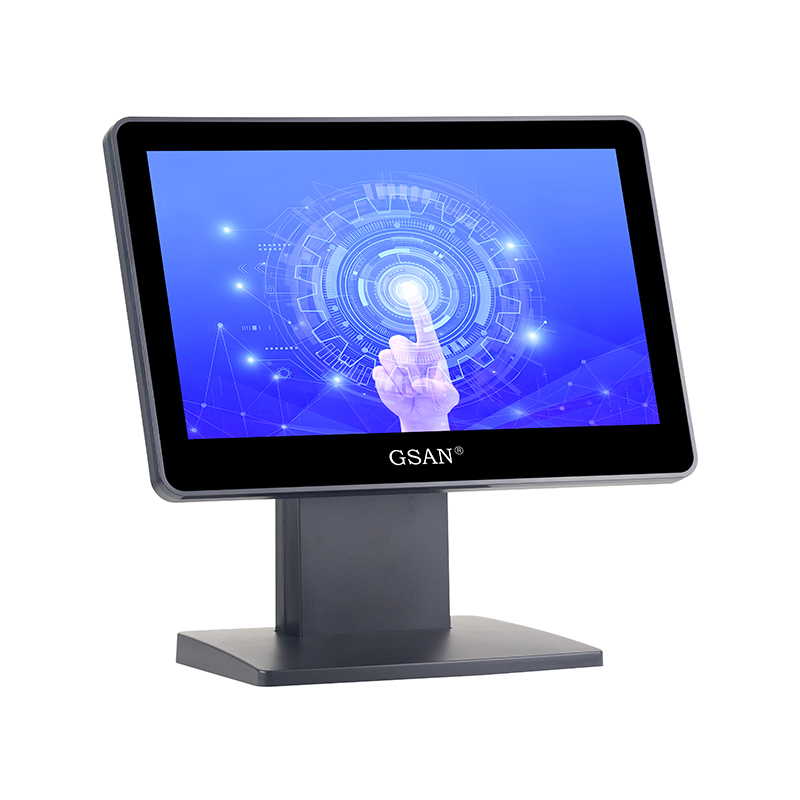
Application: Fast-casual restaurants and busy bars require high-volume order entry. Speed represents the primary metric for success in these zones.
Outcome: When cashiers use purpose-built monitors, queue times drop significantly. Staff navigate complex modifiers and menu screens instantly. This keeps lines moving and reduces guest frustration.
Requirement: You need zero-lag responsiveness. Furthermore, brightly lit venues demand anti-glare screens. Bright overhead lights will wash out a glossy consumer screen, causing staff to squint and slow down.
Application: Replacing chaotic paper ticket rails with digital order routing transforms a kitchen. The KDS serves as the digital brain of the back-of-house.
Outcome: Digital routing eliminates lost paper tickets entirely. It synchronizes course timing across different kitchen stations. The grill cook and the fry station finish their respective items at the exact same time.
Requirement: Kitchen monitors require extreme durability. Look for IP54 or IP65 ratings to resist water spray and airborne grease. The screens must remain highly operable even when cooks wear thick latex or nitrile gloves.
Best Practice: Mount KDS monitors at an angle that minimizes exposure to direct radiant heat from fryers and broilers.
Application: CFDs sit at the counter to allow guest-operated ordering, transparent checkouts, and digital tipping.
Outcome: Interactive CFDs deliver a proven increase in upselling success rates. When guests see a high-resolution photo of a dessert, they buy it more often. These displays also reduce perceived wait times and generate higher tip percentages via a frictionless user interface.
Application: Waitstaff use compact touch screens directly at the point of service. Instead of writing orders on notepads, they tap them into a mobile screen.
Outcome: This setup provides immediate order transmission directly to the kitchen display system. Drinks arrive before the server even leaves the table, resulting in much faster table turns.
Requirement: Mobile units need seamless network handoffs as servers walk through different Wi-Fi zones. They also require drop-resistant casings. Ensure these devices remain perfectly synchronized with the main restaurant POS monitor located at the primary server station.
Application: Hotels use large touch screens for Property Management System (PMS) interfacing. They double as digital guest registration stations.
Outcome: Touch interfaces streamline the check-in and check-out workflows. They allow immediate digital signature capture for folios and incidentals.
Requirement: Hotel lobbies demand a premium aesthetic. Monitors must support privacy filters so guests in line cannot see the personal data of the person checking in. Seamless integration with RFID key encoders via hidden USB ports is also essential.
Understanding technical specifications helps you buy the right hardware for specific hospitality zones. Do not buy a one-size-fits-all monitor.
Touch Technology: You must understand why a capacitive touch monitor (PCAP) acts as the industry standard for front-of-house operations. PCAP offers true multi-touch capabilities, edge-to-edge glass, and exceptional durability. It feels just like a premium smartphone. Conversely, resistive touch represents an older legacy technology. It requires physical pressure to register a tap. While resistive screens degrade faster, they still serve a purpose in heavy prep environments because they work flawlessly with heavy kitchen gloves or wet hands.
Environmental Resilience: Ingress Protection (IP) ratings matter deeply in hospitality. An IP rating tells you exactly what a monitor can withstand. For example, an IP65 rating means the unit remains entirely safe from bar spills, heavy washdowns, and kitchen flour dust. Anything below IP54 belongs in a carpeted office, not a commercial kitchen.
I/O Connectivity & Expandability: Consumer devices lack robust connectivity. When evaluating commercial monitors, look for hidden cable routing mechanisms. Check for VESA mount compatibility so you can attach the screen to poles or wall brackets. You need powered USB and Serial ports. These dedicated ports safely drive receipt printers, heavy-duty cash drawers, and handheld barcode scanners without relying on flaky Bluetooth connections.
Commercial POS Hardware Reference Chart
Feature Category | Consumer Grade Device | Commercial Grade POS Monitor |
|---|---|---|
Duty Cycle | Designed for intermittent daily use (4-6 hours). | Rated for continuous 24/7 operation. |
Touch Panel | Standard glass, easily shattered, highly reflective. | Hardened PCAP glass, anti-glare, edge-to-edge sealed. |
Enclosure Protection | No IP rating. Vulnerable to dust and liquid spills. | IP54 or IP65 sealed bezels to block water and grease. |
I/O Ports | Single USB-C or proprietary charging port. | Powered USB, Serial (RS232), RJ45 Ethernet, Cash Drawer ports. |
Purchasing excellent hardware only solves half the problem. Poor implementation ruins the staff experience and creates ongoing maintenance headaches.
Ergonomics and Cable Management: Poor mounting leads directly to staff fatigue. Cashiers standing at a bad angle develop neck and wrist strain. You must use adjustable tilt stands for high-traffic counters. Furthermore, disorganized wires cause accidental unplugs during busy shifts. Cable covers and hidden routing channels remain absolutely mandatory for a professional setup.
Network Stability Constraints: Never rely completely on wireless connections for fixed terminals. Hardware must support hardwired LAN fallback. Relying solely on Wi-Fi for stationary FOH monitors introduces massive latency during peak occupancy. When a restaurant fills with 200 guests carrying smartphones, cellular and Wi-Fi interference spikes. Hardwired ethernet ensures orders hit the kitchen instantly, regardless of crowd size.
Adoption Friction: Transitioning staff from legacy button systems requires a structured rollout. Prioritize UI familiarization during slow shifts. Let staff play with a training mode. Establish clear Standard Operating Procedures (SOPs) for screen cleaning.
Common Mistake: Using glass cleaners containing ammonia to clean PCAP displays. Abrasive chemicals quickly strip the oleophobic and anti-glare coatings from capacitive screens. Train staff to use only approved microfiber cloths and specialized screen cleaners.
Selecting the right vendor protects your venue from extended downtime. Look past the marketing gloss and dig into their support structures.
Warranty and RMA Processes: Hardware fails eventually. What happens next determines your vendor's true value. Look strictly for advanced replacement warranties. Standard return-to-base repairs leave you without a terminal for weeks. An advanced replacement program guarantees the vendor uses overnight shipping to send a replacement terminal the moment you report a failure. You swap the hard drive or cloud-sync it, pack up the broken unit in the same box, and send it back. This keeps your venue running smoothly.
Software Agnosticism: Never allow hardware to trap you into using one specific software package. Ensure the hardware supports multiple OS environments, including Windows, Android, and Linux. Software-agnostic displays grant you the freedom to change your POS software provider three years down the line without throwing away thousands of dollars in perfectly good screen hardware.
Upgrading to commercial-grade touch screens remains a foundational investment in operational speed and error reduction. It goes far beyond a simple aesthetic upgrade for your counters.
Audit your specific environmental hazards. Determine if you need IP65 waterproofing for the kitchen or anti-glare screens for the front windows.
Prioritize hardwired connectivity and advanced replacement warranties when shortlisting vendors.
Train your staff thoroughly on new interfaces and strictly enforce hardware cleaning protocols.
Request a demo unit from your short-listed vendors. Test the screen responsiveness under your venue's actual lighting and peak operational conditions before committing to a fleet-wide purchase.
A: Commercial POS monitors are engineered for continuous 24/7 duty cycles. They feature sealed, rugged bezels to block liquid spills and dust. They also provide varied physical I/O ports, like powered USB and Serial, to directly connect receipt printers and card readers securely.
A: Yes. Modern PCAP screens work effectively with thin latex or nitrile gloves. However, extremely heavy-duty prep environments where cooks wear thick, insulated gloves may still require specialized resistive or hybrid touch screens that rely on physical pressure.
A: You should expect a realistic lifespan of 3 to 5 years for high-volume commercial-grade hardware. The exact longevity depends heavily on the physical environment (heat and grease exposure) and strict adherence to proper cleaning protocols.
A: It depends on the manufacturer. Proprietary systems lock their software to their specific hardware. However, purchasing OS-agnostic displays that run standard Windows, Android, or Linux gives you the flexibility to switch POS software providers without replacing your physical screens.