



Views: 0 Author: Site Editor Publish Time: 2026-11-11 Origin: Site


Modern commerce relies on instant, accurate data capture. Barcode scanners act as the critical heartbeat for inventory management, point-of-sale, and logistics workflows. You face a core dilemma when upgrading hardware. You must choose between the rock-solid reliability of wired connections and the unmatched mobility of wireless solutions. A wired vs wireless barcode scanner comparison reveals distinct advantages for different environments. This article provides a comprehensive evaluation framework to simplify your decision. You will learn how to align hardware choices directly to your specific operational requirements and budget constraints. We guide you past basic spec sheets. You can establish a procurement strategy tailored perfectly to your facility layout, workflow speed, and long-term business goals. Whether managing a massive distribution center or a boutique retail checkout, selecting the right scanning technology prevents costly bottlenecks. We explore environmental constraints, connectivity challenges, and practical deployment steps. By the end, you will confidently determine which device best serves your daily operations.
Wired scanners are best for fixed, high-volume workstations where cable management is feasible and battery maintenance is a non-starter.
Wireless scanners are essential for environments requiring mobility, such as large warehouse floors or complex retail layouts.
Total Cost of Ownership (TCO) includes more than purchase price; it includes battery replacement, IT support for pairing, and downtime risk.
Connectivity and interference are the most common "hidden" challenges in wireless deployments.
You must thoroughly analyze your primary scanning station before purchasing hardware. The physical workspace dictates your ideal equipment profile. Consider whether your team operates a fixed POS terminal or utilizes a mobile inventory management system. Fixed stations naturally support tethered devices. Mobile workflows demand untethered flexibility.
Traffic volume and scanning speed heavily influence this choice. Assess if your workflow allows for a physical cable tether. High-speed retail checkouts often benefit from cables. The cable ensures continuous power and zero data delay. Conversely, a cable actively hinders processing time on a busy warehouse dock. Workers lose seconds untangling cords or maneuvering large items.
You must also map out specific physical environment constraints. Every facility presents unique challenges impacting hardware performance. Evaluate these critical environmental factors:
Hazardous or extreme temperature zones: Cold storage facilities rapidly degrade lithium-ion battery life. Heat exposure limits wireless device performance and longevity.
High-traffic areas: Cords create significant trip hazards in busy aisles. Heavy machinery running over dropped cables causes immediate hardware failure.
Network density: Crowded facilities often suffer from severe wireless interference. Overlapping Wi-Fi networks and Bluetooth devices disrupt scanner communication.
Best Practices: Conduct a physical walk-through of your facility. Observe how workers handle large or awkward items during peak hours.
Common Mistakes: Procurement teams often ignore environmental factors. They purchase standard wireless models for cold-storage rooms. The batteries subsequently fail mid-shift, causing severe operational delays.
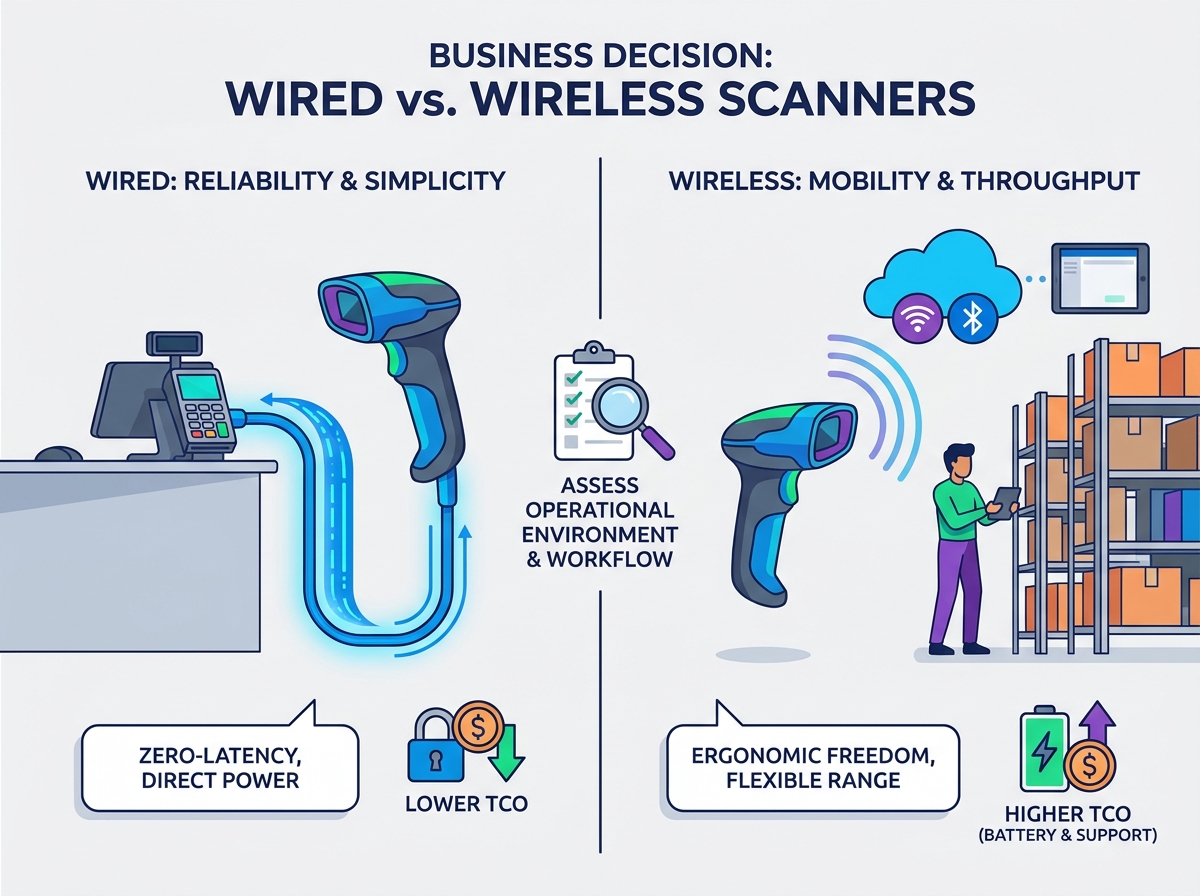
Wired barcode scanners deliver unmatched operational simplicity. They remove variables from the data capture process. The “zero-latency” advantage stands out immediately. A tethered device provides a direct, uninterrupted connection to your host system. You eliminate pairing handshake delays completely. Scanned data appears on the screen instantly. This millisecond advantage compounds during high-volume shifts.
Power management becomes effortless. You eliminate battery anxiety entirely. Wireless units require constant charging discipline. Tethered devices draw power directly from the host terminal. You never worry about degraded cells or lost charging cradles. This direct power line guarantees the scanner functions whenever the host computer runs.
Certain industries heavily favor these tethered models. Consider the following ideal use cases:
Fixed-position checkout counters (POS): Grocery stores and retail registers require rapid, repetitive scanning. Operators bring the product to the scanner.
Low-mobility light manufacturing: Assembly line workers capture part numbers at stationary desks. They rarely move beyond a two-foot radius.
Administrative data entry: Office environments processing documents or shipping labels benefit from simple plug-and-play functionality.
High-security environments: Defense contractors and government facilities restrict wireless transmissions. Cables prevent radio frequency interception.
The maintenance profile for tethered units remains exceptionally favorable. They feature lower failure rates overall. They contain fewer moving electronic parts. They lack internal batteries. They do not house delicate radio transmitters. The primary failure point is usually just the physical cable. You can easily replace a damaged cable in minutes.
Wireless models transform ergonomics and workflow efficiency. Removing the physical tether empowers your staff. They can process oversized or heavy items easily. Workers no longer struggle to lift bulky inventory onto a checkout counter. They bring the scanner directly to the pallet. This flexibility drastically reduces physical strain and speeds up processing times.
You must understand range and coverage limits. Different technologies serve different spaces. Bluetooth typically supports a communication radius of 10 to 100 meters. Wi-Fi models can roam across entire facilities using integrated access points. Physical obstructions heavily impact effective range. Metal racking, concrete walls, and heavy machinery disrupt radio signals. You should map your facility blind spots carefully.
Adopting untethered technology introduces specific operational trade-offs. You must assess the "pairing" factor. Keeping scanners connected to mobile computers or tablets requires consistent protocol management. Dropped connections halt productivity. Battery lifecycle management also requires strict oversight. You must factor in charging infrastructure. Overnight charging cradles require dedicated desk space. You also face the inevitable need for battery replacements every few years.
Despite these trade-offs, untethered scanners dominate specific strategic applications. Distribution centers rely on them for forklift operations. Retail associates use them for dynamic floor-checking and line-busting. IT departments deploy them for widespread asset tracking across corporate campuses. The operational agility often outweighs the management complexity.
Operational Feature | Tethered Hardware | Untethered Hardware |
|---|---|---|
Mobility Range | Limited by cable length (typically 3 to 6 feet) | Extensive (10 to 100+ meters depending on protocol) |
Power Source | Host device (continuous power) | Internal rechargeable battery (requires management) |
Latency | Zero latency (instant data transfer) | Minimal delay (susceptible to interference) |
Data Security | High (no radio frequency transmission) | Variable (requires proper encryption protocols) |
Primary Maintenance | Cord replacement | Battery replacement, firmware updates, pairing support |
Choosing the right hardware requires a systematic approach. Do not rely on brand preference alone. Follow this logical framework to evaluate your true operational needs. You will align your procurement strategy with daily workflow realities.
Step 1: The Mobility Audit. Map the physical path of your typical operator. Observe their daily routine. If they never leave the desk, choose a tethered model. If they roam more than three feet from the host system, choose an untethered option.
Step 2: Interference Scanning. Check your facility's current wireless landscape. Heavy Wi-Fi environments cause data collision. You may require specific frequency-hopping scanners to prevent data loss. Conduct an RF site survey in complex warehouse spaces.
Step 3: Scalability Planning. Analyze how your operation will grow. Adding ten untethered devices is easy. Adding five hundred requires robust infrastructure. Large untethered fleets often require centralized Mobile Device Management (MDM) software. Ensure your IT team has the capacity to push over-the-air updates.
Step 4: Future-Proofing. Ensure your chosen hardware supports modern barcode symbologies. Basic 1D laser scanners read standard retail codes. However, 2D imagers read QR codes, damaged labels, and digital screens. You must anticipate the data formats you will need over the next three to five years.
Best Practices: Always run a pilot program. Deploy two units of each type in a live environment for one week. Gather direct feedback from floor staff before authorizing a bulk purchase.
The "best" scanner always depends on your specific workflow rather than the technology itself. You cannot declare one hardware type universally superior. Each serves a distinct operational purpose. Wireless models offer incredible operational agility and ergonomic relief. Wired models deliver unbeatable operational simplicity and continuous uptime.
You must thoroughly assess your current infrastructure before making a purchase. Map out physical barriers, network density, and typical worker movements. Focus deeply on long-term supportability rather than immediate unit availability. Engage your IT and floor teams during the evaluation phase.
Begin by conducting a mobility audit in your highest-volume scanning zone. Document how often workers stretch, reach, or move inventory. Use this data to justify your next hardware upgrade and secure a seamless integration into your business ecosystem.
A: Generally, no. Scanning hardware is built specifically for one connectivity type or the other. Internal architectures differ vastly. It is better to plan your infrastructure based on current and near-term future needs rather than attempting aftermarket modifications.
A: Bluetooth models communicate directly with a dedicated cradle or host device. Wi-Fi models communicate directly with your facility network. Both require initial configuration. However, Wi-Fi models demand deeper integration with your local IT security protocols to ensure safe data transmission.
A: This varies by usage intensity and environmental temperatures. Most industrial-grade batteries last two to three years under standard operating conditions. Always factor battery degradation into your long-term maintenance strategy to prevent mid-shift failures.
A: Physical distance from the base station causes most dropouts. Electromagnetic interference from other warehouse equipment or high-density Wi-Fi routers also disrupts signals. Solid obstacles like metal racking and concrete walls frequently block transmission paths.


